
I discovered this tool while streaming Valorant with my squad. Someone dared me to use a voice changer mid-match just to confuse our teammates, which led me to look for a reliable voice changer for PC.
Most tools I found were either paid or had terrible audio quality. After testing a few apps, I ended up choosing iTop Voicy. Here is everything I found after using it closely for one full week.
What is iTop Voicy?
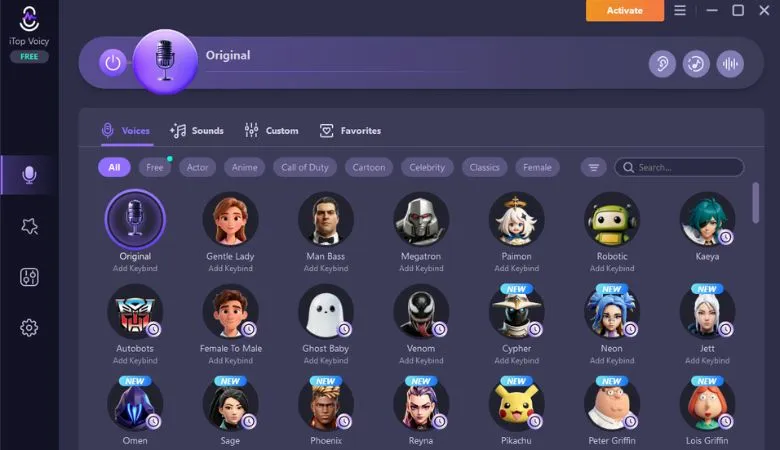
iTop Voicy is a free voice transformation tool from iTop Inc. It uses advanced AI to change your voice in real time with very low latency. It supports Windows 10 and 11. You can use it across games, social apps and streaming platforms without any extra setup.
How to Set It Up in 4 Simple Steps
Getting started was fast and painless. Here is exactly how I did it.
Step 1: Download and Install
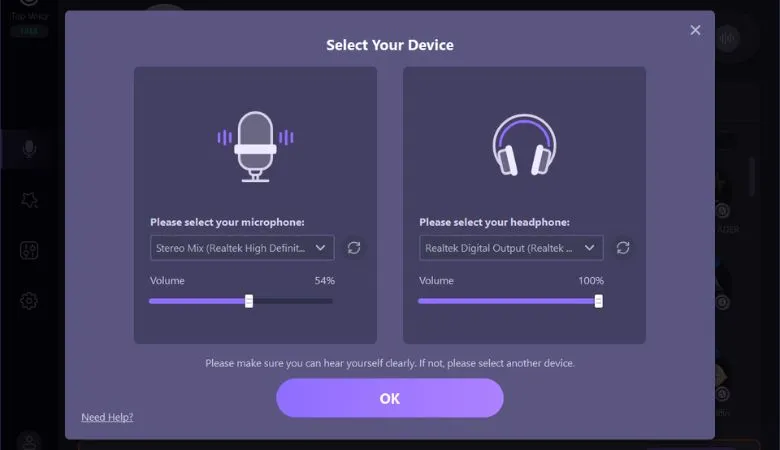
Head over to the iTop Voicy page and grab the free setup file. Run it and follow the instructions shown on screen. Installation takes less than two minutes, even on a slow machine. After that, you need to configure your microphone.
Step 2: Browse and Choose a Voice
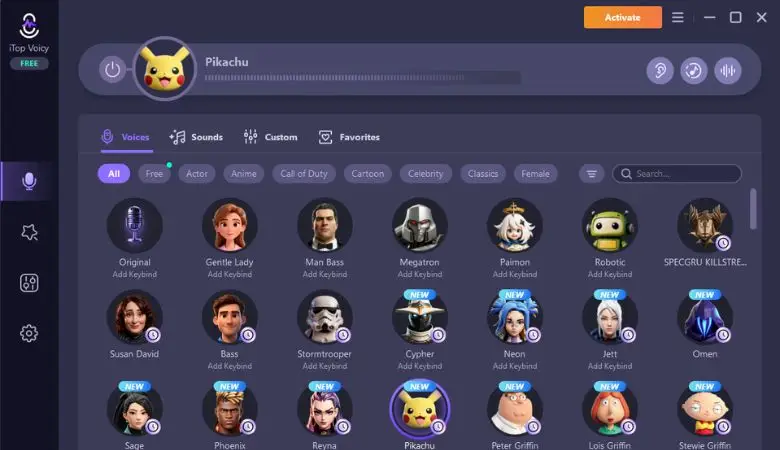
You will see a large library of voice models right away. I browsed through robot voices, anime voices, and deep villain tones. Pick one that fits your style, then click to apply it.
Step 3: Set iTop Voicy as Your Mic Input
Open your game, Discord or OBS settings. Find the microphone input section and select iTop Voicy from the list. This links the voice changer directly to your streaming or chat platform. It took me under 30 seconds to complete.
Step 4: Start Playing and Switch on the Fly
Start your game or go live and talk as you would normally. Selected voice is played in real-time immediately. Take advantage of custom keybinds to change voices while playing games. I switched voices during a Valorant match without any interruption.
My Real Experience During Valorant Streams
I ran three streaming sessions over one week using iTop Voicy. Voice changes were instant with no noticeable delay. My squadmates were fully fooled by my chosen character voice. Audio came through crisp and clean even when I layered sound effects on top.
I also had a little time in the Voice Lab. Pitch, timbre and formant can be modified to make a completely unique-sounding voice. There is also a feature of applying noise reduction and echo cancellation to get cleaner sounds. Making a custom voice from scratch was a great deal of fun. It was as if it were a real audio studio inside a free app.
Another interesting thing I learned was that I could change my voice while I was in a session. I set up different keys to different voices. Just one click and I was changed from a robot voice to a female anime voice. My chat reacted right away and started guessing what tool I was using. That level of live engagement is hard to beat.
For content creators, iTop Voicy also lets you change voice in recorded audio and video files. You can export your result in multiple formats. This makes it easy to use your edited content anywhere.
Pros
- Free to download with no payment needed
- Quick setup that works even for beginners
- Smooth performance across Valorant and Fortnite
- Clear audio quality, even with effects applied
- Large voice library with something for every style
Cons
- Some voice models need tuning to sound fully natural
- App layout can feel a bit busy for brand-new users
- A few advanced effects require pro version
Who Will Benefit Most?
This tool suits streamers, gamers, and video creators best. Beginners can jump in using preset voices with zero effort. Power users will love the Voice Lab for building unique custom voices. It works great for pranks and fun conversations on Discord.
If you run a podcast or create YouTube content, the file voice-changing feature adds real value, too. Even casual users with no technical background will find it easy to enjoy.
Final Verdict
After a full week of testing, I have no major complaints. It is one of those rare free tools that actually feels premium. iTop Voicy stands out as a solid free voice changer for PC that truly delivers.
Sound quality is good, and every feature is clearly useful. A few minor issues exist, but they do not hurt the overall experience. If you want a fun and capable voice tool for gaming or streaming, go ahead and try it out today.