
We spend an average of seven or more hours daily staring at screens, and every minute exposes our eyes to blue light emissions that can contribute to digital eye strain, disrupted sleep cycles, and long-term visual discomfort. It’s no surprise that anti-blue light screen protectors have become one of the most popular accessories for smartphone users, particularly among iPhone owners who want to safeguard their vision without sacrificing display quality.
Here’s the problem most people don’t realize: a significant number of users install their screen protectors incorrectly. The result? Trapped air bubbles that distort the display, misalignment that leaves edges exposed, and compromised blue light filtering that defeats the entire purpose of the investment.
For new iPhone owners especially, a botched installation often means peeling off a perfectly good protector and starting over—or worse, assuming it’s working when it isn’t. This guide walks you through everything you need to know about proper installation techniques, ongoing maintenance, and understanding durability factors so your anti blue light screen protector performs exactly as intended from day one.
Why Proper Installation is Crucial for Anti Blue Light Screen Protectors
Anti-blue light screen protectors work through a specialized coating or embedded filtering layer that absorbs or reflects specific wavelengths of blue light before they reach your eyes. When this protector is installed with even slight misalignment or trapped debris underneath, the filtering layer cannot make uniform contact with your display surface.
The result is uneven light transmission—some areas block blue light effectively while others allow it to pass through virtually unfiltered. You might think you’re protected when portions of your screen are still delivering the same harsh blue light emissions you were trying to avoid.
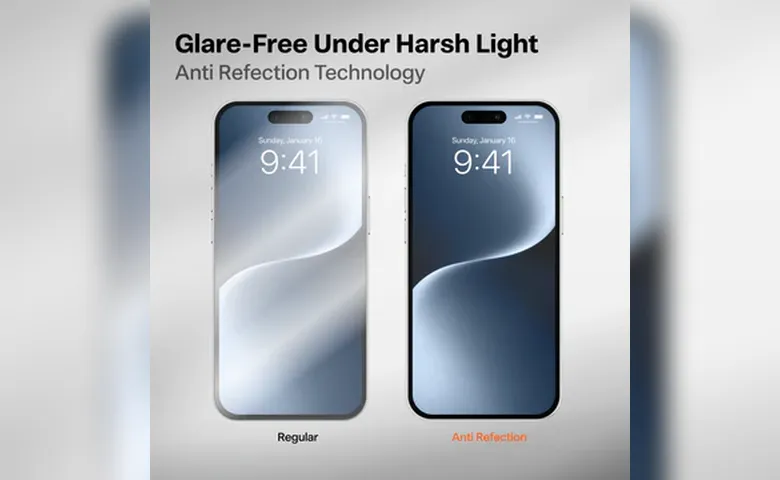
Air bubbles present a different but equally problematic issue. Each bubble creates a tiny pocket where light refracts unpredictably, causing glare spots and reducing screen clarity.
Over time, these imperfections also create weak points in the protector’s structure, making it more susceptible to cracking or peeling at the edges. Misalignment compounds this by leaving thin strips of your iPhone’s screen exposed to potential scratches and direct blue light exposure along the borders.
For new iPhone owners, getting the installation right on the first attempt matters more than you might expect. Removing and reapplying a screen protector weakens its adhesive layer, meaning the second application rarely bonds as cleanly as the first.
This compromised adhesion leads to earlier lifting at corners, more dust infiltration over time, and a shorter overall lifespan. The money spent on a quality anti-blue light protector only delivers its full value when the installation is precise, clean, and done with intention from the very start.
Step-by-Step Guide to Screen Protector Installation for iPhone Owners
Getting your anti-blue light screen protector installed correctly doesn’t require professional skill—it requires preparation, patience, and a systematic approach. The following method works consistently across all iPhone models and eliminates the most common installation failures that new users encounter.
Pre-Installation: Gathering Tools and Preparing Your Workspace
Before you touch the screen protector packaging, assemble your tools: a microfiber cloth, dust removal stickers (often included in quality protector kits from brands like TORRAS), a small squeegee or card, and if available, an alcohol-based screen cleaning wipe.
The environment matters just as much as the tools themselves. Bathrooms immediately after a hot shower work surprisingly well because the steam settles airborne dust particles. Alternatively, any small room with minimal air circulation and no fans or open windows will serve the purpose. Turn off nearby fans and avoid installing near pets or fabric surfaces that shed fibers.
Place your iPhone on a flat, stable surface at a comfortable working height, and wash your hands thoroughly to remove oils that could transfer to the adhesive side of the protector.
The Core Installation Process: A Foolproof Method
- Start by cleaning your iPhone screen with the alcohol wipe, moving in one direction rather than circular motions to avoid redistributing oils. Follow immediately with the microfiber cloth to remove any remaining moisture or streaks.
- Use the dust removal stickers to dab the entire screen surface—press and lift repeatedly, paying special attention to speaker grilles and edges where particles accumulate. Hold the phone at an angle under bright light to confirm the surface is completely free of debris; even a single speck will create a visible imperfection under the protector.
- Now peel back the protective backing on the screen protector only partially—about one-third of the way. Align the exposed adhesive edge with your iPhone’s top edge, using the earpiece speaker cutout and front camera as reference points.
- Once alignment looks precise, lower that top portion onto the screen and let it begin adhering naturally. Slowly peel the remaining backing while using your other hand or the squeegee to guide the protector downward in a smooth, controlled motion. Apply gentle, even pressure from the center outward to push air ahead of the adhesion line rather than trapping it underneath.
- If you notice a dust particle during this process, stop immediately—lift the nearest edge with a piece of tape, use a dust sticker to remove the particle, then continue the application.
Post-Installation Checks and Troubleshooting
Once applied, hold your iPhone under direct light and examine the entire surface at multiple angles. Small bubbles near the edges often resolve themselves within 24 to 48 hours as the adhesive fully cures.
For persistent bubbles in the center, press firmly with the squeegee and push the trapped air toward the nearest edge. If a bubble won’t budge, it likely contains a trapped particle—use a small piece of clear tape to gently lift the protector at the closest corner, remove the debris with a dust sticker, and carefully re-lay that section.
Check alignment by verifying equal border spacing on all sides and confirming that the camera cutout, sensors, and earpiece remain fully unobstructed. For new users who feel uncertain, resist the urge to repeatedly lift and reposition the entire protector.
Targeted corrections to specific sections preserve adhesive integrity far better than full removal and reapplication.
Essential Screen Protector Maintenance for Longevity
Installing your anti-blue light screen protector correctly is only half the equation—how you care for it daily determines whether it lasts three months or well over a year. The filtering layer that blocks blue light wavelengths is surprisingly resilient when treated properly, but it degrades quickly under the wrong conditions. Building simple habits into your routine keeps the protector functioning at full capacity and maintains the crystal-clear visibility you expect from your iPhone display.
- For daily cleaning, use only a soft microfiber cloth slightly dampened with water or a screen-safe cleaning solution.
- Wipe gently in straight lines from top to bottom rather than scrubbing in circles, which can create micro-scratches over time that scatter light and reduce the protector’s optical clarity.
- Avoid paper towels, tissues, or clothing fabric—these materials contain wood fibers or rough textures that leave fine abrasions invisible to the naked eye but noticeable under direct light.
- Never spray cleaning solution directly onto the screen; instead, apply it to the cloth first to prevent liquid from seeping beneath the protector’s edges and weakening the adhesive bond.
- Weekly, inspect the edges of your protector for early signs of lifting or dust accumulation along the border.
- If you notice a corner beginning to separate, press it firmly back into place immediately before debris works its way underneath.
- Keep your iPhone away from loose pockets filled with keys or coins, and consider a case with a slight lip that rises above the screen surface.
- This small raised edge absorbs impact from flat drops and prevents the protector from contacting abrasive surfaces when placed face-down.
Harsh chemicals like ammonia-based cleaners, alcohol in high concentrations, or acetone will strip the anti-blue light coating permanently, so stick exclusively to products labeled safe for coated screens.
Evaluating the Durability of Screen Protectors: What to Know
Not all anti-blue light screen protectors are built equally, and understanding what affects their durability helps you set realistic expectations and make smarter purchasing decisions.
The two primary material categories—tempered glass and film-based protectors—differ dramatically in how they handle daily wear. Tempered glass options typically rate between 9H and 10H on the hardness scale, meaning they resist scratches from keys, coins, and most everyday objects while maintaining structural integrity after minor impacts.
Film protectors offer flexibility and a thinner profile but sacrifice scratch resistance and tend to show wear marks sooner, particularly around areas of frequent touch like the keyboard zone.
Impact resistance depends heavily on thickness and the manufacturing process used to temper the glass. A well-made protector absorbs shock by distributing force across its surface, cracking in a controlled pattern rather than transferring that energy to your iPhone’s actual display. However, even the most durable protector has limits—repeated drops onto hard surfaces, pressure from sitting on the phone, or bending stress from tight pockets all shorten its functional life regardless of quality.
Your installation and maintenance habits directly influence how long a protector lasts. A properly installed protector with full adhesive contact resists edge chipping and moisture intrusion far longer than one with compromised bonding.
Environmental factors matter too—extreme temperature swings can weaken adhesive over time, and humid climates accelerate edge lifting. For new iPhone owners, choosing a protector that matches your lifestyle intensity and pairing it with correct installation and consistent care means you’ll replace it on your own timeline rather than being forced to by premature failure.
Maximize Your Screen Protection with Proper Installation and Care
A properly installed anti-blue light screen protector does exactly what it promises—reduces harmful blue light exposure, preserves your iPhone’s display clarity, and protects the screen from daily wear. But that protection only works as intended when installation is precise, maintenance is consistent, and you understand what determines how long your protector will last.
The steps outlined here—preparing a clean workspace, aligning carefully using reference points, applying with controlled pressure, and troubleshooting issues without compromising adhesive integrity—give you the foundation for a flawless first application.
Beyond installation day, your habits define the protector’s lifespan. Gentle cleaning with appropriate materials, regular edge inspections, and mindful storage away from abrasive objects keep the filtering layer intact and the surface optically clear.
Take a moment now to examine your current screen protector under bright light. Check for bubbles you’ve been ignoring, edges that have started lifting, or alignment issues you’ve accepted as normal. If something looks off, you now have the knowledge to correct it or recognize when replacement makes more sense than repair.
Your eyes deserve the full benefit of the protection you’ve invested in—make sure your installation delivers it.